Proxies
Why a proxy
Section titled “Why a proxy”Without a proxy, every profile connects from your computer’s internet address, and websites can link your accounts by it. A proxy per profile (or per small group) gives each its own address in the country you choose. Ant0 also sets the profile’s time zone and language from that country.
Proxies are shared. Add one once, then use it in as many profiles as you like. If you change its password, every profile that uses it gets the change.
Adding proxies
Section titled “Adding proxies”Choose Add proxy. You can Paste URL or provider line (one proxy per line, then Preview to see what Ant0 understood) or Enter fields. Types are HTTP, HTTPS, SOCKS5 and SOCKS4. Accepted forms:
http://user:pass@host:porthttps://user:pass@host:portsocks5://user:pass@host:portsocks4://userid@host:porthost:port:user:pass (the common provider layout)host:port (no credentials)A line without a type is treated as HTTP. Name each proxy, or keep the default host:port. Ant0
reuses duplicates (same type, host, port and user).
Under Advanced you can set:
- Change-IP URL: the link some providers give to rotate the IP.
- Session pattern: put
{session}where a fresh random ID should go. - Provider: a label for your own use.
- Relay UDP through the proxy: SOCKS5 only. It stops sites from seeing your real IP through video calls and fast connections.
SOCKS4 has a user ID but no password, and no UDP. A SOCKS4 proxy stays on this computer and does not sync to your others.
The check
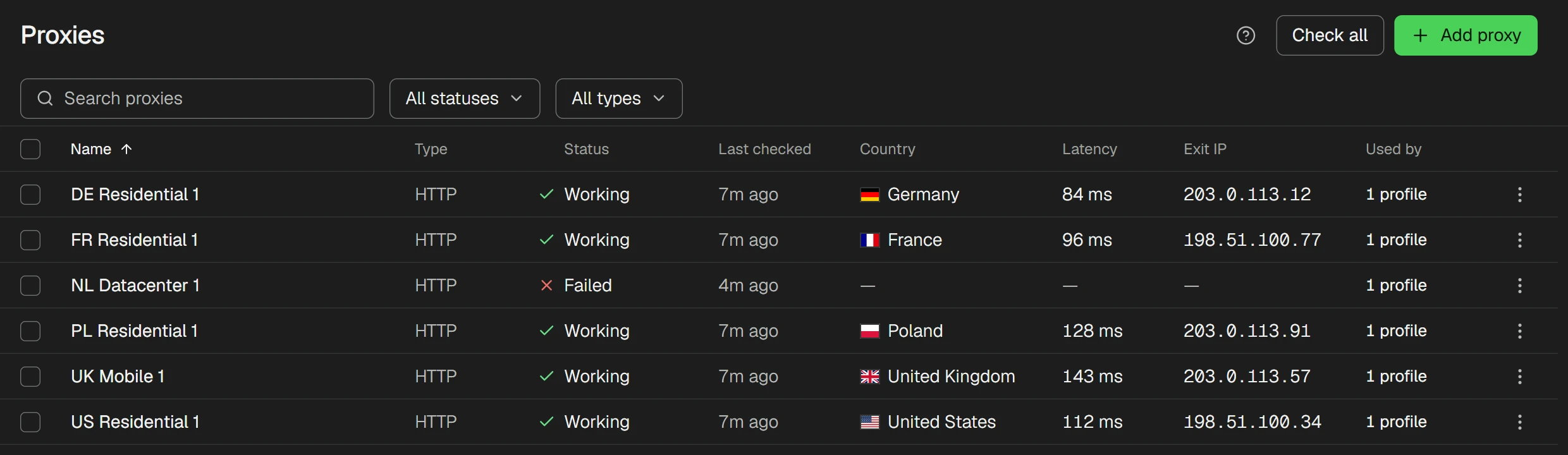
Section titled “The check”Ant0 checks a proxy when you add it. Choose Check now on a row, or tick rows and choose Check, to run it again. Check all checks every proxy. The table shows:
| Column | Meaning |
|---|---|
| Status | Working, Failed, Not checked, Checking…, Slow (worked, but slowly) or Check is old (run Check now to confirm). Hover for the reason. |
| Last checked | When the check ran. |
| Exit IP | The address websites see. |
| Country | Country of the exit IP, with its flag. |
| Latency | Round trip through the proxy. |
| Used by | How many profiles use this proxy. |
A profile whose proxy failed its last check appears in Needs attention.
Changing the IP
Section titled “Changing the IP”If a proxy has a change-IP URL, choose Change IP in its row menu. Ant0 asks the provider for a new address, then checks again. Providers that rotate on their own need nothing from you.
Editing and removing
Section titled “Editing and removing”Edit a proxy to change its address, credentials, name or tags. Profiles using it pick up the change at their next start. You cannot delete a proxy that a profile still uses. Change those profiles first.
Automation
Section titled “Automation”Proxies are also available in the command line and the local API.
© 2026 Ant0