Import from another tool
In short
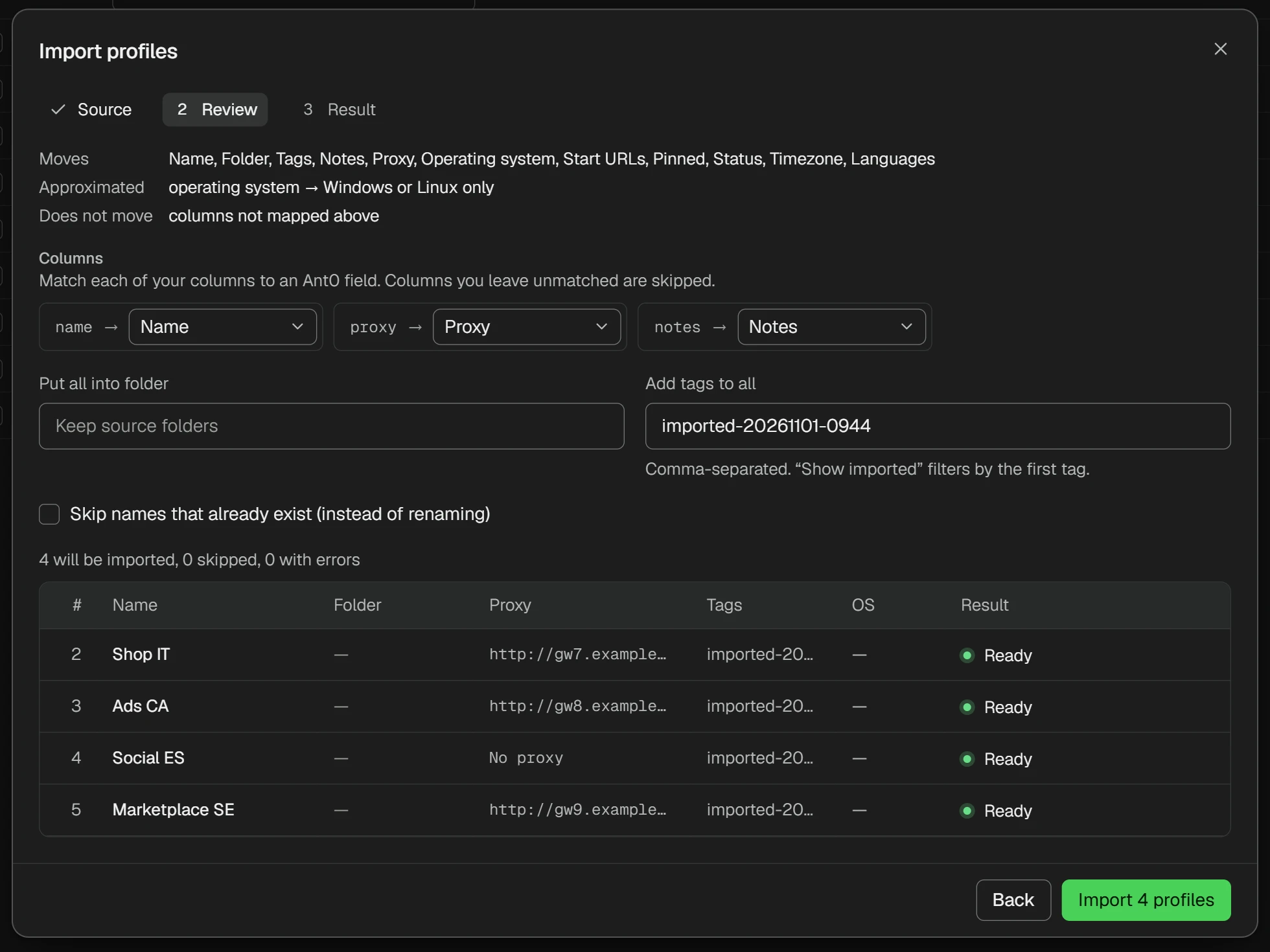
Section titled “In short”On the Profiles screen, the Import menu has CSV file, Multilogin export, GoLogin export, AdsPower export and Paste. The Import profiles dialog has three steps: Source, Review and Result. Choose a file (CSV, TSV, JSON or TXT, up to 16 MB) or paste text. Ant0 detects the source, shows every row for review, and creates the profiles. Names, folders, tags, notes, proxies and start URLs come along. Identity values and cookies do not. Each imported profile gets a new Ant0 identity. You can import its cookies afterwards.
Imported profiles get an imported-<date> tag. In the review step you can use Add tags to all
and Put all into folder to change tags and folder. Show imported finds the batch later.
Sources
Section titled “Sources”| Source | What to export there | What Ant0 reads |
|---|---|---|
| AdsPower | Profile export (Excel saved as CSV, or the TXT export), the Bulk Create template, or Local API JSON | name, remark → notes, group_name → folder, tab → start URLs, proxytype + proxy + proxyurl → proxy and change-IP link, operating system family from ua |
| Multilogin X / 6 | Profile JSON from the API (profile/metas, profile/search) or Multilogin 6 profile JSON | name, notes, tags, parameters.proxy, custom_start_urls, operating system family; folder only when the export carries a folder name |
| GoLogin | Export profiles CSV, the Import profiles template, or profile JSON from the API | name, notes, folder, tags, isPinned, startUrl, proxy and proxy.changeIpUrl, operating system family |
| CSV / TSV | Any table with a header row | name (required), group, tags, notes, proxy, os, start_urls, pinned, timezone, language |
English and Chinese headers (名称, 备注, 分组) are recognised. In the review step you can match
any other column to an Ant0 field. Columns you leave unmatched are skipped.
What changes
Section titled “What changes”- Operating system: Windows and Linux stay as they are. macOS, Android and iOS profiles become Windows.
- Time zone and languages: kept only if the source set them by hand. Otherwise Ant0 uses the proxy’s country.
- Built-in proxy networks (GoLogin’s own, Multilogin’s residential network, saved AdsPower proxies that are not in the file) cannot move. The profile is imported without a proxy and the row says so.
- Other proxy types (SOCKS4, SSH) are dropped the same way. HTTP, HTTPS and SOCKS5 work.
What does not move
Section titled “What does not move”Identity values, cookies, bookmarks, extension lists, website logins, passwords and 2FA keys, and the source’s own IDs. The review shows “N fields not imported” per row, with the field names on hover.
The CSV format
Section titled “The CSV format”name,group,tags,notes,proxy,os,start_urls,pinnedshop-01,Shops,eu;vip,first,http://user:pass@1.2.3.4:8080,windows,https://example.com,truetagsandstart_urlsare separated by;(or,for tags).proxyis a URL (scheme://user:pass@host:port) or a provider line (host:port:user:pass).pinnedacceptstrue/false,1/0,yes/no.- Header names are not case-sensitive.
tag,noteandstart_urlalso work.
For bulk creation from the command line or API, see the command line and local API.
Review outcomes
Section titled “Review outcomes”| Outcome | Meaning |
|---|---|
| Ready | Created as shown. |
| Renamed | The name exists. The new name is shown (name (2)). Tick Skip names that already exist to skip instead. |
| Ready with notes | Imported with a change from the list above. |
| Skipped | The name exists and Skip names that already exist is on. |
| Error | No name, or an unreadable proxy. The row is not imported. |
If you cancel, profiles already created stay. Failures appear on the result step with the profile name and the reason.
After the import
Section titled “After the import”- Import cookies from the other tool if you have them: Cookies → Import cookies… in the row menu (Cookie-Editor JSON or Netscape format; see Cookies). You can do this while the profile is stopped. The cookies load at its next start.
- Check the Proxies screen. Failed proxies show in Needs attention.
- Sign in to each account inside its profile. Sessions do not transfer. A fresh sign-in with the right proxy is the clean start.
© 2026 Ant0